Hey networking enthusiasts! 👋
Have you ever clicked "Send" on a message and wondered:
"What actually happens after I press this button?"
Maybe you're sending a WhatsApp message.
Maybe you're opening YouTube.
Maybe you're logging into your favorite website.
It feels instant.
But behind the scenes, your data embarks on a fascinating journey through protocols, routers, switches, cables, wireless signals, and networking layers that work together with incredible precision.
Every text message, email, meme, API request, Netflix stream, and cat video depends on the same fundamental architecture.
That architecture is called the OSI Model.
Once you understand these seven layers, you'll start seeing networking problems differently.
Slow internet?
DNS issues?
SSL certificate errors?
Packet loss?
Connection timeouts?
The OSI Model provides a framework for understanding them all.
Let's dive in. 🚀
Why Was the OSI Model Created?
In the early days of networking, every vendor had its own way of building network systems.
Computers from different manufacturers often struggled to communicate with one another.
The networking world needed a common language.
To solve this problem, the International Organization for Standardization (ISO) created the OSI (Open Systems Interconnection) Model.
The goal was simple:
Create a standardized framework that explains how data moves from one device to another.
The OSI model doesn't define specific technologies.
Instead, it provides a conceptual framework that helps engineers understand networking by dividing communication into seven logical layers.
Think of it as a blueprint for understanding how the internet works.
What Is the OSI Model?
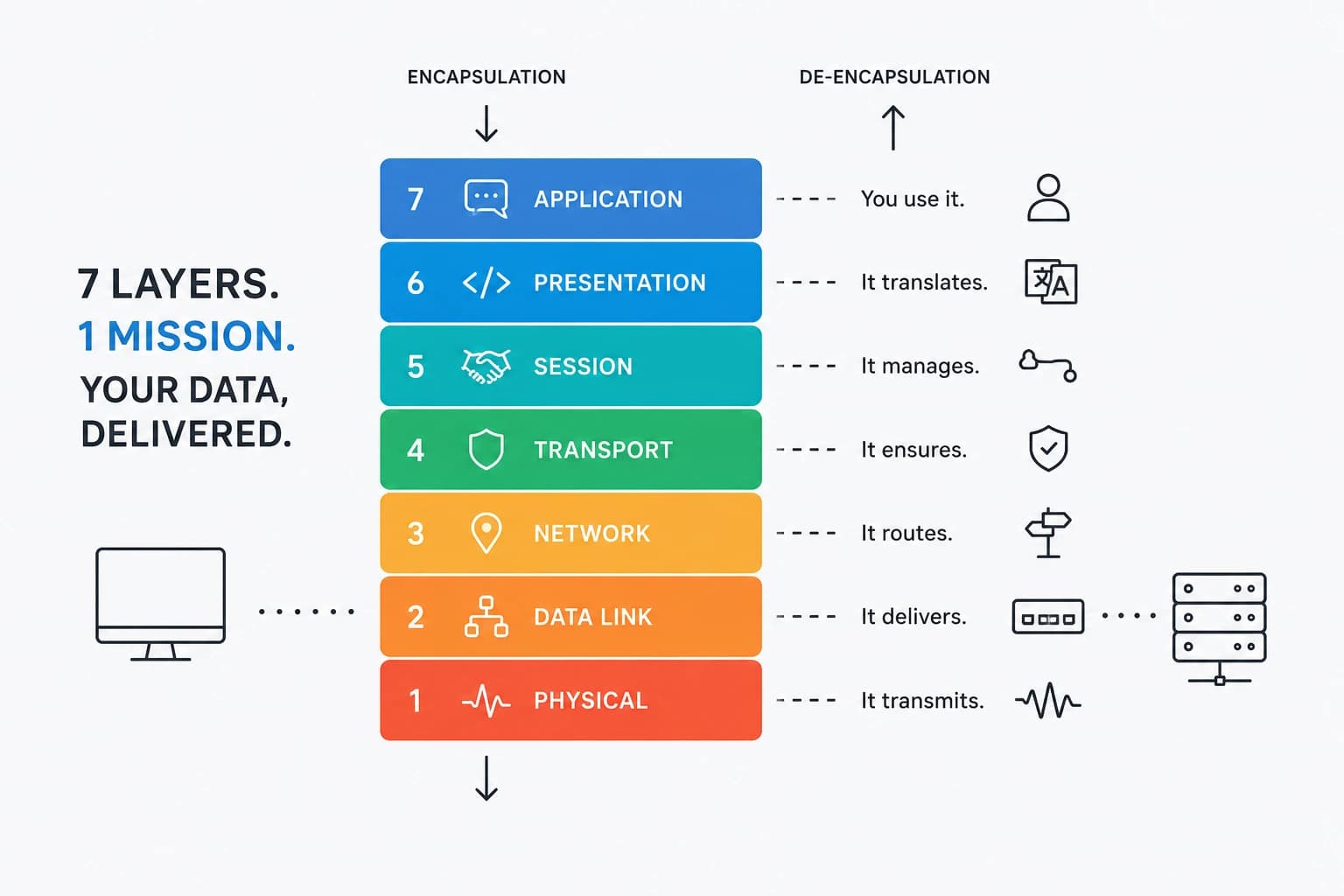
The OSI Model divides network communication into seven layers.
Each layer has a specific responsibility.
Each layer communicates with the layer above and below it.
Together, they create a complete communication system.
The seven layers are:
| Layer | Name |
|---|---|
| 7 | Application |
| 6 | Presentation |
| 5 | Session |
| 4 | Transport |
| 3 | Network |
| 2 | Data Link |
| 1 | Physical |
A useful way to think about this:
Each layer is a specialist handling one part of the communication process.
Let's meet the seven secret agents of the internet.
Meet the 7 Secret Agents of the Internet
Imagine you're sending this message:
Let's meet at 8. 🌐
Before it reaches your friend, every OSI layer contributes something important.
Layer 7 Application (The Diplomat)
This is the layer closest to users.
When you interact with:
- Chrome
- Firefox
- Gmail
- Slack
- Microsoft Teams
you're operating at the Application Layer.
Technically, this layer includes protocols such as:
- HTTP
- HTTPS
- DNS
- SMTP
- FTP
- IMAP
The Application Layer answers questions like:
- What service is being requested?
- Which protocol should be used?
- What resource is being accessed?
For example:
When you type:
https://www.aniksikder.me/
your browser creates an HTTP request.
The Application Layer initiates the communication.
Think of it as the diplomat preparing the message before it begins its journey.
Layer 6 Presentation (The Translator)
The Presentation Layer ensures that both systems understand the data being exchanged.
Its responsibilities include:
- Data formatting
- Encryption
- Decryption
- Compression
- Encoding
Imagine two people speaking different languages.
The Presentation Layer acts as the translator.
Real-world examples include:
- TLS/SSL encryption
- UTF-8 text encoding
- Image compression
- Video encoding
When you access an online banking application, this layer helps encrypt sensitive information before transmission.
Without this layer, secure communication would be difficult.
Layer 5 Session (The Coordinator)
The Session Layer manages conversations between systems.
Its responsibilities include:
- Establishing sessions
- Maintaining sessions
- Terminating sessions
Imagine joining a Zoom meeting.
Before communication begins:
- The meeting starts.
- Participants connect.
- The session remains active.
- Eventually, the meeting ends.
That's exactly what the Session Layer manages.
It acts like a conference coordinator ensuring both parties remain connected and synchronized.
Layer 4 Transport (The Bodyguard)
The Transport Layer ensures reliable delivery of data.
Its primary responsibilities include:
- Segmentation
- Reliability
- Error recovery
- Flow control
- Port management
The two most famous Transport Layer protocols are:
TCP (Transmission Control Protocol)
TCP prioritizes reliability.
It guarantees:
- Ordered delivery
- No duplication
- Error detection
- Retransmission of lost packets
Used by:
- Websites
- Banking applications
- APIs
- Email systems
UDP (User Datagram Protocol)
UDP prioritizes speed.
It provides:
- Faster delivery
- Lower overhead
- No delivery guarantees
Used by:
- Gaming
- Voice calls
- Video conferencing
- Live streaming
Think of TCP as registered mail and UDP as dropping a postcard in the mailbox.
One guarantees delivery.
The other prioritizes speed.
Layer 3 Network (The Navigator)
The Network Layer handles routing.
This is where IP addresses come into play.
Responsibilities include:
- Logical addressing
- Routing
- Path selection
Protocols include:
- IPv4
- IPv6
- ICMP
Example:
Your laptop in Bangladesh wants to reach a web server in Singapore.
The Network Layer determines how that packet travels across multiple networks to reach its destination.
Routers operate primarily at this layer.
Think of this layer as Google Maps for internet traffic.
Layer 2 Data Link (The Local Post Office)
The Data Link Layer handles communication within the local network.
Its responsibilities include:
- MAC addressing
- Framing
- Error detection
- Local delivery
At this layer, packets become frames.
Every network card has a unique MAC address.
Example:
Your laptop sends data to a nearby switch.
The switch examines MAC addresses to determine where the frame should go.
Common technologies include:
- Ethernet
- Wi-Fi
- VLANs
Switches primarily operate at Layer 2.
Think of this layer as your neighborhood postal service.
Layer 1 Physical (The Muscle)
The Physical Layer moves raw bits.
This layer deals with:
- Electrical signals
- Light signals
- Radio waves
- Physical hardware
Examples include:
- Ethernet cables
- Fiber optics
- Wireless signals
- Connectors
- Patch panels
Without this layer, nothing moves.
Everything eventually becomes:
1s and 0s
transmitted through physical media.
This is the foundation of all networking.
Following a Real Packet Journey
Let's send a simple message:
Let's meet at 8. 🌐
Here's what happens.
Layer 7
Creates the application request.
Layer 6
Encodes and encrypts the message.
Layer 5
Establishes the communication session.
Layer 4
Breaks the message into segments.
Adds TCP headers.
Layer 3
Adds source and destination IP addresses.
Creates packets.
Layer 2
Adds MAC addresses.
Creates frames.
Layer 1
Converts everything into electrical signals, light pulses, or radio waves.
Then the journey begins.
Encapsulation Explained
As data moves down the OSI stack, each layer adds its own information.
This process is called Encapsulation.
The transformation looks like this:
Application Data
       ↓
TCP Segment
       ↓
IP Packet
       ↓
Ethernet Frame
       ↓
Bits
Every layer wraps the data with additional information.
Think of it like shipping a gift.
You place the item in a box.
Then another box.
Then a shipping label.
Then a tracking sticker.
Each layer adds information required for successful delivery.
The Journey Across the Internet
Imagine you're opening a website hosted in Singapore.
Your request:
- Leaves your computer.
- Reaches your local switch.
- Travels to your router.
- Passes through your ISP.
- Traverses multiple networks.
- Reaches the destination data center.
- Arrives at the web server.
At each stage:
- Switches examine MAC addresses.
- Routers examine IP addresses.
- Firewalls inspect traffic.
- Load balancers distribute requests.
All of this happens in milliseconds.
De-Encapsulation: Unwrapping the Gift
When the packet reaches the destination server, the process reverses.
This is called De-Encapsulation.
The server removes information layer by layer:
Bits
 ↓
Frame
 ↓
Packet
 ↓
Segment
 ↓
Application Data
Eventually, the original message becomes visible.
Let's meet at 8. 🌐
Mission accomplished.
Devices That Operate at Each Layer
Different networking devices specialize in different layers.
| Layer | Device Examples |
|---|---|
| 1 | Hubs, Cables, Repeaters |
| 2 | Switches, Bridges |
| 3 | Routers |
| 4 | Firewalls, Load Balancers |
| 7 | Reverse Proxies, API Gateways, WAFs |
Understanding this mapping is extremely useful when troubleshooting.
OSI Model vs TCP/IP Model
One common interview question is:
"What's the difference between OSI and TCP/IP?"
The OSI model contains seven layers.
The TCP/IP model simplifies things into four layers.
| OSI | TCP/IP |
|---|---|
| Application | Application |
| Presentation | Application |
| Session | Application |
| Transport | Transport |
| Network | Internet |
| Data Link | Network Access |
| Physical | Network Access |
The internet actually operates using TCP/IP.
The OSI model is primarily used as a learning and troubleshooting framework.
Troubleshooting with the OSI Model
One reason engineers love the OSI model is troubleshooting.
Consider these examples.
No Link Light?
Check:
Layer 1
Possible issues:
- Broken cable
- Bad port
- Hardware failure
Cannot Reach Other Devices?
Check:
Layer 2
Possible issues:
- Incorrect VLAN
- MAC table problems
- Switch misconfiguration
Cannot Reach External Networks?
Check:
Layer 3
Possible issues:
- Wrong IP address
- Missing gateway
- Routing problems
Connection Refused?
Check:
Layer 4
Possible issues:
- Blocked port
- Firewall rules
- TCP connectivity issues
HTTPS Errors?
Check:
Layer 6
Possible issues:
- SSL certificate problems
- Encryption mismatches
Website Doesn't Load?
Check:
Layer 7
Possible issues:
- DNS failures
- Application errors
- Web server issues
Using the OSI model helps engineers systematically isolate problems.
Why Every Engineer Should Learn the OSI Model
Even if you're not a network engineer, the OSI model is incredibly valuable.
It helps:
- Backend developers understand APIs
- DevOps engineers troubleshoot infrastructure
- Security professionals analyze attacks
- Cloud engineers design architectures
- Software engineers debug connectivity issues
Many networking concepts become easier once you understand where they fit within the OSI model.
Why the OSI Model Matters
The OSI model isn't just exam material.
It's one of the most useful mental models in technology.
It helps explain:
- How websites load
- How emails travel
- How APIs communicate
- How cloud systems connect
- How network problems occur
Even though modern networks don't strictly implement the OSI model, its concepts remain fundamental.
TL;DR Quick Recap
- The OSI Model contains seven layers.
- Each layer has a specific networking responsibility.
- Data travels down the stack through encapsulation.
- Data travels up the stack through de-encapsulation.
- Layer 4 uses TCP and UDP.
- Layer 3 handles IP addressing and routing.
- Layer 2 handles MAC addresses and local delivery.
- Layer 1 handles physical transmission.
- The OSI model remains one of the best troubleshooting frameworks in networking.
Final Thoughts
Every time you send a message, load a webpage, stream a video, or make an API call, an incredible amount of work happens behind the scenes.
The OSI model helps us understand that complexity.
At first, it may seem like a theoretical framework.
But once you start working with networks, servers, cloud infrastructure, containers, cybersecurity tools, or distributed systems, you'll realize that these layers appear everywhere.
Understanding them doesn't just make you better at networking.
It makes you better at technology.
Because beneath every application lies a network.
And beneath every network lies the elegant architecture that keeps the modern internet running.
A Little Joke to End On
Why did the packet get lost?
Because it couldn't find its route and refused to ask the router for directions. 😄
Frequently Asked Questions
What is the OSI Model?
The OSI Model is a seven-layer conceptual framework used to understand how data moves across networks.
Why was the OSI Model created?
It was created to standardize networking concepts and improve interoperability between systems.
How many layers are in the OSI Model?
There are seven layers:
- Application
- Presentation
- Session
- Transport
- Network
- Data Link
- Physical
What is encapsulation?
Encapsulation is the process of adding headers and metadata as data moves down the networking stack.
What is de-encapsulation?
De-encapsulation is the reverse process where each layer removes its information as data moves upward.
Which layer uses IP addresses?
The Network Layer (Layer 3).
Which layer uses MAC addresses?
The Data Link Layer (Layer 2).
What is the difference between TCP and UDP?
TCP provides reliable delivery.
UDP prioritizes speed and lower overhead.
Which device operates at Layer 2?
Switches primarily operate at Layer 2.
Which device operates at Layer 3?
Routers primarily operate at Layer 3.
Is the OSI Model still relevant today?
Absolutely.
It remains one of the most important frameworks for learning networking and troubleshooting network issues.
Key Takeaways
- The OSI Model divides networking into seven logical layers.
- Each layer performs a specialized role.
- Encapsulation prepares data for transmission.
- De-encapsulation reconstructs the original message.
- TCP and UDP operate at the Transport Layer.
- IP addresses belong to the Network Layer.
- MAC addresses belong to the Data Link Layer.
- Switches and routers make forwarding decisions using different layers.
- The OSI Model remains one of the best tools for understanding and troubleshooting networks.
If you found this article useful, share it with fellow developers, network engineers, DevOps professionals, and cybersecurity enthusiasts who want to better understand how the internet really works.
About the Author
Anik Sikder is a Software Engineer specializing in Backend Systems, SaaS Architecture, Cloud Infrastructure, Python, Django, FastAPI, networking fundamentals, and scalable software engineering.
He writes about Python, networking, system design, distributed systems, cloud computing, cybersecurity, and modern engineering practices.