Hey networking enthusiasts! 👋
When you hear "loopback address," chances are your brain immediately jumps to 127.0.0.1, the famous localhost.
Maybe you've used it to:
- Test a web server
- Verify your network stack
- Run local development environments
- Troubleshoot connectivity issues
For many people, that's where the story ends.
✅ Ping works.
✅ Server responds.
✅ Problem solved.
But the truth is far more interesting.
Behind that seemingly ordinary IP address lies an important piece of internet architecture that has existed since the early days of TCP/IP.
Understanding loopback addresses helps explain how operating systems communicate internally, why NAT works the way it does, and how modern applications safely communicate with themselves.
Let's explore the hidden power of 127.0.0.1. 🚀
What Is 127.0.0.1 Really?
The loopback address is not simply another IP address.
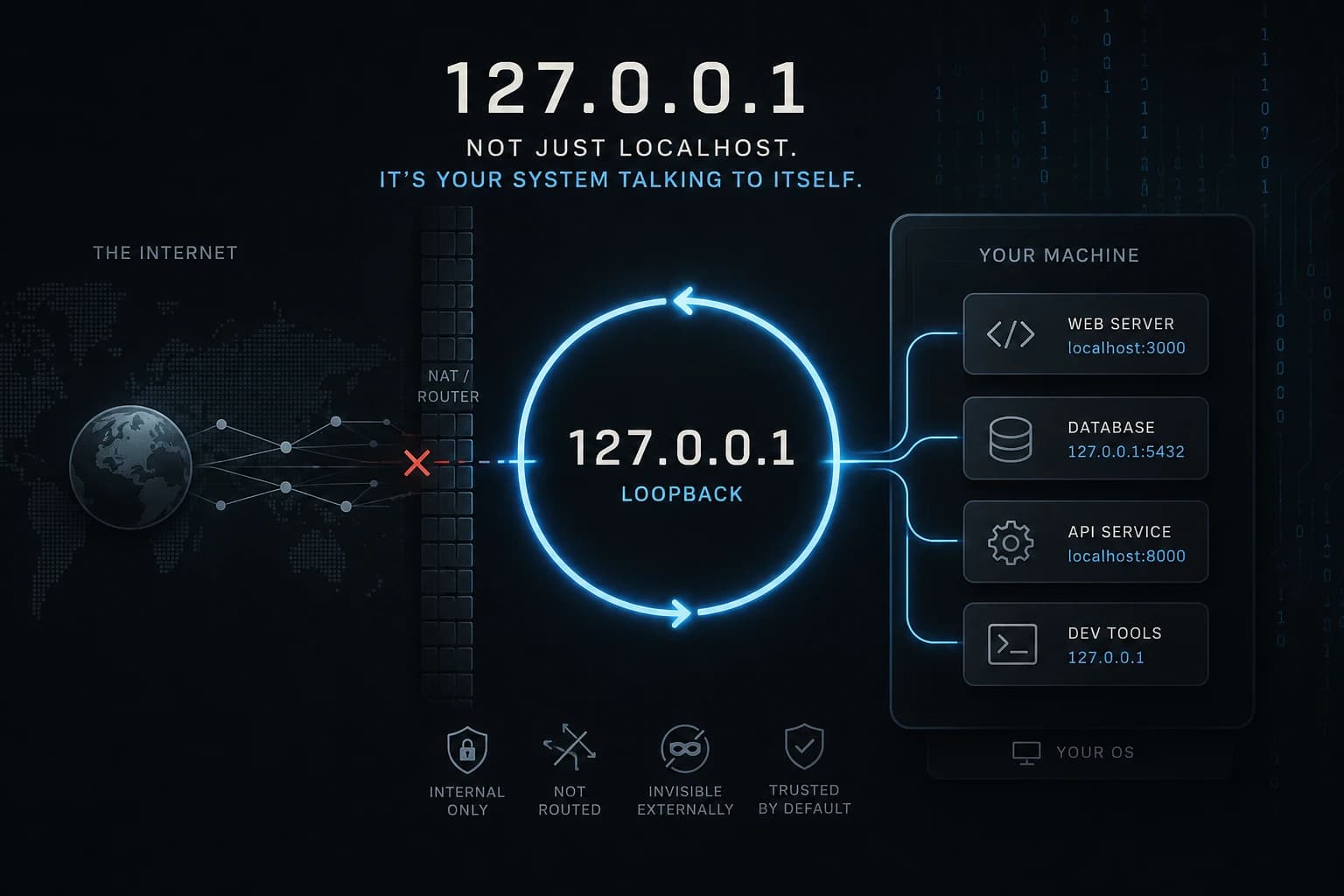
It is a special reserved address designed specifically for a computer to communicate with itself.
Most developers know:
127.0.0.1
However, the entire loopback block actually spans:
127.0.0.0 - 127.255.255.255
Within that range, 127.0.0.1 became the universally recognized address commonly mapped to:
localhost
Unlike ordinary IP addresses:
- It never reaches a physical network card.
- It cannot be routed externally.
- It never leaves the operating system.
- It exists entirely within the TCP/IP stack.
Think of it as sending a letter to yourself without ever using a mailbox.
The message still travels through the communication system, but it never leaves your possession.
Why Loopback Exists
Modern operating systems need a reliable way to test networking functionality without requiring:
- Internet connectivity
- Ethernet hardware
- Wi-Fi access
- Routers or switches
The loopback interface provides exactly that.
It allows software to use the networking stack exactly as it would in production while remaining completely isolated from the outside world.
This makes loopback an invaluable tool for:
- Application development
- Network troubleshooting
- Service communication
- Internal testing
Without loopback, developers would need external network infrastructure just to test basic networking functionality.
Loopback and IPv4 Architecture
IPv4 reserves several address blocks for special purposes.
Examples include:
| Address Range | Purpose |
|---|---|
10.0.0.0/8 | Private Networking |
172.16.0.0/12 | Private Networking |
192.168.0.0/16 | Private Networking |
169.254.0.0/16 | APIPA |
224.0.0.0/4 | Multicast |
127.0.0.0/8 | Loopback |
Each reserved block solves a different networking challenge.
Private IP ranges enable internal networks.
Multicast enables one-to-many communication.
APIPA provides automatic addressing.
Loopback serves a completely different role.
It is not designed for communication between devices.
It is designed for communication within a single device.
That distinction makes it unique.
Loopback vs NAT
One of the biggest misconceptions is that loopback behaves similarly to private IP addresses.
It doesn't.
Private IPs participate in networking.
Loopback does not.
Consider a private address:
192.168.1.100
This address can:
- Reach other devices
- Pass through switches
- Reach routers
- Be translated by NAT
Now consider:
127.0.0.1
This address:
- Never reaches a router
- Never enters NAT
- Never appears on the network
- Never leaves the host
In fact, routers are required to reject loopback traffic.
This isolation is what makes the loopback interface so powerful.
Why NAT Cannot Touch Loopback
When IPv4 address exhaustion became a concern, Network Address Translation (NAT) emerged as a solution.
NAT allows multiple devices to share a single public IP address.
However, loopback traffic never enters the networking path where NAT operates.
Because of that:
- Loopback traffic cannot be translated.
- Loopback traffic cannot be forwarded.
- Loopback traffic cannot be exposed externally.
From the perspective of your network infrastructure, loopback traffic simply does not exist.
It remains entirely inside the operating system.
Common Real-World Uses
Most developers interact with loopback every day without thinking about it.
Local Development
A web server running on:
http://localhost:3000
is typically listening on:
127.0.0.1:3000
Only your machine can access it.
Database Security
Databases such as PostgreSQL, MySQL, and Redis are often configured to listen only on:
127.0.0.1
This prevents external devices from connecting directly.
Internal Service Communication
Applications frequently expose internal APIs through loopback interfaces.
This enables services on the same machine to communicate securely without opening external ports.
Testing and Troubleshooting
A simple command:
ping 127.0.0.1
can quickly determine whether the local TCP/IP stack is functioning correctly.
Docker and Container Networking
Loopback becomes particularly interesting when containers enter the picture.
A common misunderstanding is assuming:
localhost
inside a Docker container refers to the host machine.
It does not.
Inside a container:
127.0.0.1
points to the container itself.
This often causes confusion when applications attempt to connect to services running on the host system.
Understanding this distinction is essential when working with:
- Docker
- Kubernetes
- Containerized microservices
Security Implications
Many people assume loopback automatically means secure.
That's only partially true.
Loopback traffic is isolated, but applications bound to loopback can still create security risks.
Examples include:
- Misconfigured admin dashboards
- Development services accidentally exposed through proxies
- Malware using loopback for hidden communication
Security professionals frequently audit loopback-bound services because trust boundaries can become blurry.
A useful principle is:
Private does not automatically mean secure.
Always authenticate and authorize sensitive services, even when they listen only on loopback interfaces.
Loopback in IPv6
IPv6 dramatically simplifies loopback addressing.
Instead of an entire /8 block, IPv6 uses a single address:
::1
Functionally, it serves the same purpose as:
127.0.0.1
The operating system routes traffic internally without ever touching the network.
Whether you're using IPv4 or IPv6, the concept remains identical.
Why Every Engineer Should Understand Loopback
Loopback appears simple on the surface.
Yet it sits at the intersection of:
- Operating systems
- Networking
- Security
- Cloud infrastructure
- Containers
- Application architecture
Understanding how it works provides deeper insight into:
- TCP/IP behavior
- Network isolation
- Service communication
- Security boundaries
It is one of those foundational concepts that quietly powers modern computing.
TL;DR Quick Recap
127.0.0.1is the most commonly used loopback address.- The full loopback range is
127.0.0.0/8. - Loopback traffic never leaves the host machine.
- Routers and NAT never process loopback traffic.
- Developers use loopback extensively for testing and local development.
- Databases commonly bind to loopback for security.
- Docker containers have their own independent loopback interfaces.
- IPv6 uses
::1as its loopback address. - Loopback is fundamental to networking, security, and operating system design.
Final Thoughts
At first glance, 127.0.0.1 looks like just another IP address.
In reality, it's one of the most important addresses in the entire internet protocol suite.
Every time you use localhost, you're witnessing a carefully engineered mechanism that allows software to communicate internally while remaining completely isolated from the outside world.
It's a small detail that reveals a much bigger story about how networks were designed to scale, separate responsibilities, and maintain security.
The next time you type:
localhost
remember that you're not merely connecting to your machine.
You're interacting with one of the most elegant features ever built into the TCP/IP architecture.
Frequently Asked Questions
What is 127.0.0.1?
127.0.0.1 is the most commonly used IPv4 loopback address that allows a computer to communicate with itself.
What is localhost?
localhost is a hostname that typically resolves to 127.0.0.1 in IPv4 and ::1 in IPv6.
Does loopback traffic leave the computer?
No.
Loopback traffic is processed entirely within the operating system and never reaches a physical network interface.
Can routers route 127.0.0.1 traffic?
No.
Routers are designed to reject loopback traffic.
Is 127.0.0.1 a private IP address?
No.
It belongs to the reserved loopback range and serves a different purpose from private IP ranges like 192.168.x.x.
Why do developers use localhost?
Developers use localhost to run and test applications locally without exposing them to external networks.
What is the IPv6 equivalent of 127.0.0.1?
The IPv6 loopback address is:
::1
Why doesn't NAT affect loopback traffic?
Because loopback traffic never leaves the operating system and never reaches networking components that perform NAT.
Does Docker have its own localhost?
Yes.
Each container has its own network namespace and its own loopback interface.
Is localhost secure?
It is isolated from external networks, but applications bound to localhost should still implement proper authentication and authorization.
Key Takeaways
127.0.0.1is a special loopback address, not a regular network address.- Loopback traffic never leaves the operating system.
- The entire loopback range spans
127.0.0.0/8. - NAT and routers never process loopback traffic.
- Localhost is essential for testing, development, and secure service communication.
- Docker introduces separate loopback environments for containers.
- IPv6 uses
::1for loopback functionality. - Understanding loopback provides deeper insight into networking fundamentals.
If you found this article useful, share it with fellow developers, network engineers, and DevOps professionals who want to understand the hidden mechanics behind modern networking.
About the Author
Anik Sikder is a Software Engineer specializing in Backend Systems, SaaS Architecture, Cloud Infrastructure, Python, Django, FastAPI, networking fundamentals, and scalable software engineering.
He writes about Python, system design, distributed systems, networking, cybersecurity, cloud platforms, and modern engineering practices.