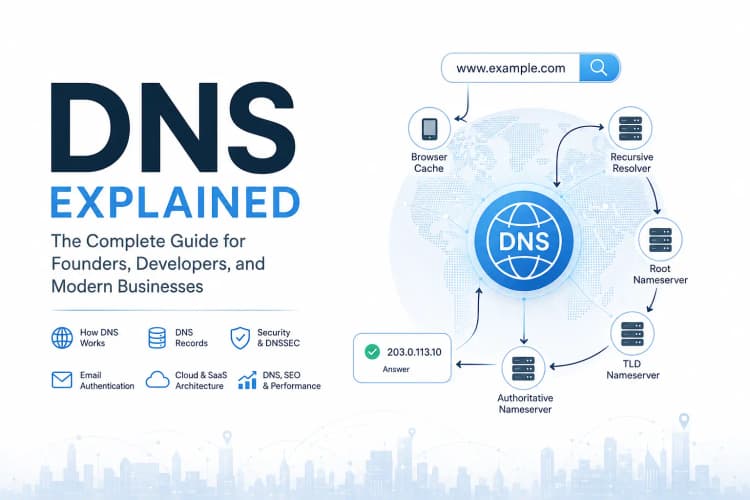
In the previous article, we explored how DNS translates human-friendly domain names into machine-friendly IP addresses and how a request travels through recursive resolvers, root servers, TLD servers, and authoritative nameservers before finally reaching a destination.
That journey answers how DNS works.
This article answers a different question:
What information is DNS actually returning?
When a DNS resolver contacts an authoritative nameserver, it isn't simply asking for an IP address.
It is asking for a specific record.
Those records determine:
- Where websites live
- Where email should be delivered
- Which servers are authoritative
- How domains are verified
- How email is authenticated
- How cloud services are discovered
- How SaaS platforms connect custom domains
- How modern internet infrastructure operates
In other words:
DNS resolution is the process.
DNS records are the data.
Understanding DNS records is where DNS knowledge becomes practical.
Whether you're launching a website, migrating infrastructure, configuring email, deploying applications, implementing custom domains, or troubleshooting production systems, DNS records sit at the center of the operation.
Why DNS Records Matter More Than Most People Realize
Many internet outages aren't caused by application bugs.
They aren't caused by database failures.
They aren't caused by cloud providers.
They're caused by configuration mistakes.
A misplaced DNS record can:
- Take an entire website offline
- Stop customer emails from arriving
- Break API connectivity
- Prevent SSL certificate issuance
- Disrupt SaaS onboarding
- Cause search engines to lose access to content
The irony is that DNS records are often configured once and forgotten until something breaks.
That's why understanding them matters.
DNS Records: The Source of Truth Behind Every Domain
Imagine someone enters:
example.com
into a browser.
Eventually the request reaches the authoritative nameserver.
The authoritative nameserver responds with records stored inside its DNS zone.
Example:
example.com. IN A 203.0.113.10
The response tells the internet:
example.com
       ↓
203.0.113.10
That single record determines where traffic goes.
Without DNS records, DNS itself would be useless.
Understanding DNS Record Types
Modern DNS contains dozens of record types.
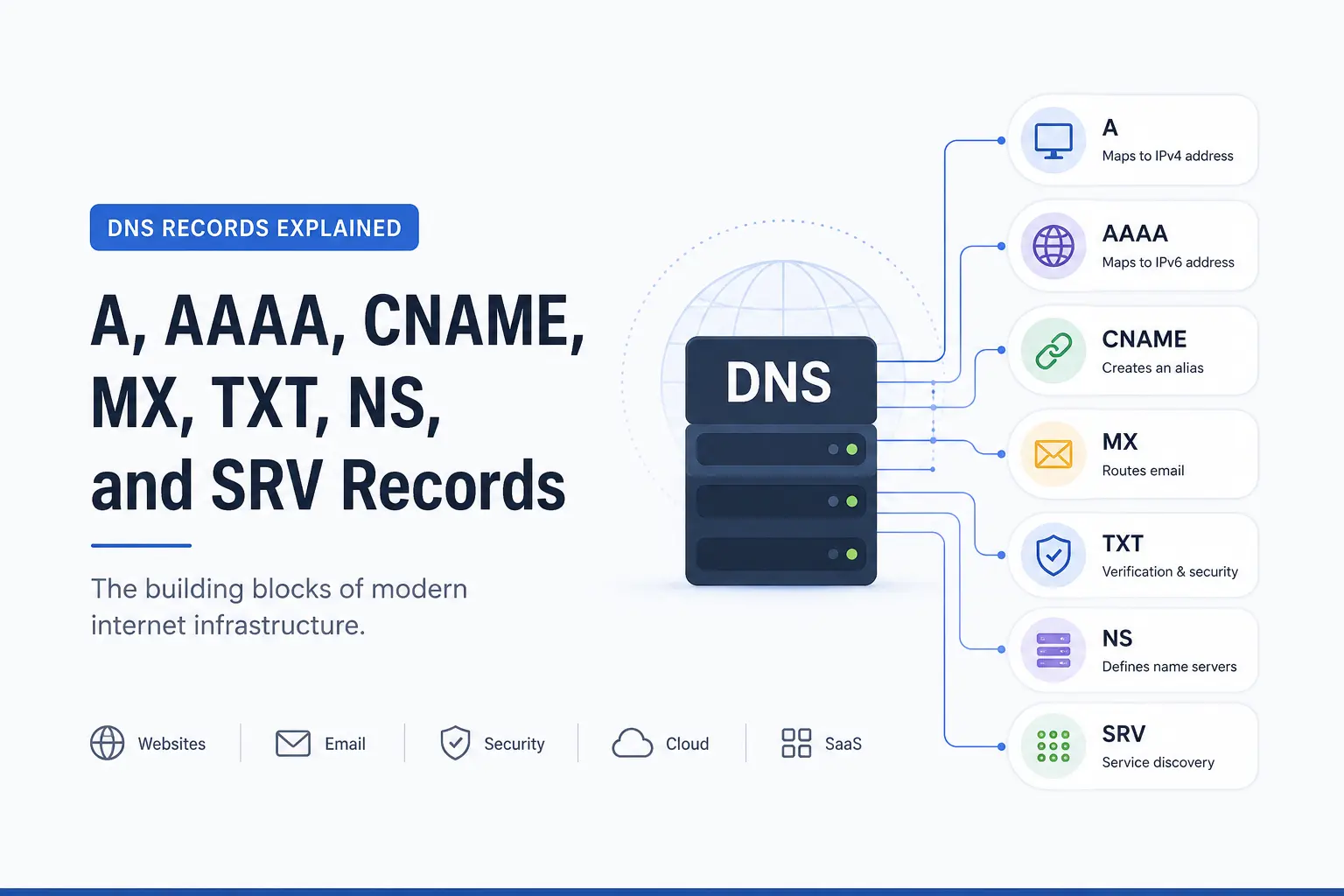
However, seven records power the overwhelming majority of websites, applications, email systems, and cloud services.
| Record Type | Primary Purpose |
|---|---|
| A | Maps hostname to IPv4 |
| AAAA | Maps hostname to IPv6 |
| CNAME | Creates aliases |
| MX | Routes email |
| TXT | Verification and security |
| NS | Defines authoritative nameservers |
| SRV | Service discovery |
These records form the foundation of modern internet infrastructure.
A Record Explained
The A Record is the most fundamental DNS record.
The "A" stands for:
Address
It maps a hostname directly to an IPv4 address.
Example:
example.com. IN A 203.0.113.10
This creates a direct relationship:
example.com
       ↓
203.0.113.10
When someone visits the domain, traffic is sent to that server.
Why A Records Are So Important
Every website needs a destination.
The A Record provides that destination.
Without it:
- Browsers cannot locate servers
- Applications cannot connect
- APIs become unreachable
Even the most advanced infrastructure eventually depends on records that resolve to an IP address.
Where A Records Are Commonly Used
Typical examples include:
company.com
portfolio.com
store.com
api.company.com
app.company.com
Almost every publicly accessible website uses A records somewhere in its architecture.
Production Reality: A Record Migrations
One of the most common infrastructure projects involves moving applications between servers.
For example:
Old Server
203.0.113.10
becomes:
New Server
203.0.113.50
Updating the A Record redirects traffic globally without requiring users to change anything.
This simple capability is one reason DNS remains such a powerful abstraction layer.
AAAA Record Explained
The AAAA Record performs the same role as an A Record.
The difference is the addressing standard.
| Record | Protocol |
|---|---|
| A | IPv4 |
| AAAA | IPv6 |
Example:
example.com. IN AAAA 2001:db8::1
Why IPv6 Exists
IPv4 provides approximately:
4.3 Billion Addresses
That seemed enormous in the early days of the internet.
Today, it isn't.
Cloud computing, smartphones, IoT devices, smart vehicles, and connected infrastructure accelerated address consumption dramatically.
IPv6 was created to solve that limitation.
Should Every Website Use AAAA Records?
Not necessarily.
A common mistake is enabling IPv6 before infrastructure is ready.
If an application doesn't properly support IPv6, users may experience connectivity problems despite having perfectly functioning IPv4 infrastructure.
IPv6 should be enabled deliberately rather than automatically.
CNAME Record Explained
CNAME stands for:
Canonical Name
Unlike an A Record, a CNAME does not point to an IP address.
Instead, it points to another hostname.
Example:
www.example.com IN CNAME example.com
Which effectively means:
www.example.com
         ↓
example.com
         ↓
203.0.113.10
Why CNAME Records Exist
Imagine managing:
www.example.com
blog.example.com
docs.example.com
shop.example.com
If each hostname pointed directly to an IP address, every infrastructure change would require updating multiple records.
CNAME records eliminate that complexity.
One change updates every dependent hostname.
Why Modern SaaS Platforms Love CNAME Records
Custom domains have become a standard expectation.
Instead of:
customer.platform.com
many organizations prefer:
app.customer-domain.com
The most common implementation relies on CNAME records.
This approach allows millions of customer domains to connect to shared infrastructure while maintaining branding and flexibility.
The Hidden Complexity of Custom Domains
What appears simple on the surface often requires:
- Domain ownership verification
- DNS validation
- SSL certificate provisioning
- Traffic routing
- Edge network configuration
Behind a single CNAME record is often a surprisingly sophisticated platform architecture.
CNAME vs A Record
One of the most common questions is:
When should an A Record be used?
When pointing directly to an IP address.
Example:
example.com IN A 203.0.113.10
When should a CNAME be used?
When pointing to another hostname.
Example:
www.example.com IN CNAME example.com
Simple Rule
Use:
A Record
for servers.
Use:
CNAME
for aliases.
MX Record Explained
MX stands for:
Mail Exchange
MX records tell the internet where incoming email should be delivered.
Example:
example.com IN MX 10 mail.example.com
Without MX records:
Email cannot function.
Why MX Records Matter More Than Most Websites
A website outage is visible.
An email outage often isn't.
Messages simply disappear.
Leads go unanswered.
Support requests never arrive.
Invoices are missed.
Customers assume silence means neglect.
The business impact can be substantial.
Understanding MX Priority
Example:
MX 10 mail-primary.example.com
MX 20 mail-backup.example.com
Lower values receive priority.
If the primary server becomes unavailable, mail automatically flows to the backup system.
This redundancy improves reliability.
TXT Record Explained
TXT records are among the most flexible records in DNS.
Historically they stored simple text.
Today they support critical infrastructure functions.
TXT Records Power Modern Trust Systems
Many internet services rely on TXT records to verify ownership.
Examples include:
- Google Search Console
- Microsoft 365
- Cloud platforms
- Email providers
- SSL certificate services
Example:
google-site-verification=abc123
This proves domain ownership without requiring direct server access.
TXT Records and Email Security
TXT records are heavily used by:
SPF
Defines authorized email senders.
v=spf1 include:_spf.google.com ~all
DKIM
Provides cryptographic email signatures.
DMARC
Defines authentication policies.
Together these technologies help reduce:
- Email spoofing
- Phishing
- Domain impersonation
In modern environments, email security is largely a DNS problem before it becomes an email problem.
NS Record Explained
NS stands for:
Name Server
NS records define which nameservers hold authority over a domain.
Example:
example.com IN NS ns1.cloudflare.com
example.com IN NS ns2.cloudflare.com
These records tell the internet:
These servers contain the source of truth.
Why NS Records Matter
Without NS records, the DNS hierarchy breaks.
Resolvers would have no way of discovering where authoritative information lives.
Every lookup ultimately depends on NS records.
They form the bridge between domain ownership and DNS management.
A Real Infrastructure Example
A domain may be registered through one provider.
DNS may be hosted elsewhere.
For example:
Registrar:
Namecheap

DNS Provider:
Cloudflare
NS records connect those two systems.
SRV Record Explained
SRV stands for:
Service Record
SRV records provide more information than a simple address.
They specify:
- Service
- Protocol
- Port
- Priority
- Weight
Example:
_sip._tcp.example.com
Why SRV Records Exist
Many applications need more than an IP address.
Examples include:
- SIP systems
- VoIP platforms
- Active Directory
- Enterprise applications
- Gaming infrastructure
SRV records allow applications to discover services automatically.
This reduces manual configuration and improves scalability.
DNS Records Every Modern Website Typically Uses
A standard production setup often includes:
Website Access
A Record
CNAME Record
Email Infrastructure
MX Record
SPF
DKIM
DMARC
Security and Verification
TXT Record
DNS Authority
NS Record
DNS Records During Website Migrations
Website migrations often fail because DNS planning is treated as an afterthought.
Common mistakes include:
- Forgetting MX records
- Removing TXT records
- Incorrect TTL settings
- Deleting verification records
- Breaking email authentication
Successful migrations involve auditing DNS before moving infrastructure.
DNS Records and Search Visibility
DNS records do not directly improve rankings.
However, they influence systems that do.
Reliable DNS supports:
- Website availability
- Search engine accessibility
- Email trust
- User experience
- Infrastructure reliability
Poor DNS management can undermine otherwise excellent websites.
Quick Reference Table
| Goal | Record Type |
|---|---|
| Host a Website | A |
| Enable IPv6 | AAAA |
| Create an Alias | CNAME |
| Receive Email | MX |
| Verify Domain Ownership | TXT |
| Configure SPF | TXT |
| Configure DKIM | TXT |
| Configure DMARC | TXT |
| Delegate DNS Authority | NS |
| Discover Services | SRV |
Frequently Asked Questions
What are the most important DNS record types?
For most websites:
- A
- CNAME
- MX
- TXT
- NS
cover the majority of use cases.
What is the difference between an A Record and a CNAME Record?
An A Record points directly to an IP address.
A CNAME points to another hostname.
Which DNS record is used for email?
MX records route email.
TXT records support SPF, DKIM, and DMARC authentication.
What DNS records are required for Google Workspace?
Typically:
- MX
- SPF
- DKIM
- DMARC
along with verification records.
Can a website function without DNS records?
No.
DNS records provide the information required to locate services and resources.
Key Takeaways
- DNS records are the data layer of DNS.
- A Records connect hostnames to IPv4 addresses.
- AAAA Records connect hostnames to IPv6 addresses.
- CNAME Records create aliases.
- MX Records control email routing.
- TXT Records power verification and security.
- NS Records define authoritative nameservers.
- SRV Records support service discovery.
- Modern websites, cloud platforms, SaaS applications, and email systems depend on DNS records.
- Understanding DNS records helps prevent outages, improve reliability, and simplify infrastructure management.
About the Author
Anik Sikder is a Software Engineer specializing in Python, Django, FastAPI, Cloud Infrastructure, DevOps, Networking, and Software Architecture.
He writes about DNS, System Design, Cloud Computing, Distributed Systems, SaaS Architecture, Cybersecurity, and scalable software engineering practices.